JB4 Mobile
- 3.4
- Rating
- 50.00K
- Installs
- $27.99
- Price

 Analysis by App-foxy
JB4 Mobile is the kind of sports app that only makes sense once you already use a JB4 tuner. I tested it with that relationship in mind, and my main takeaway is simple: it is not a general car-performance app or a casual dashboard replacement. It is a focused companion for viewing and recording information from a compatible JB4 setup. When you want a practical way to watch what the tuner is doing during a drive and keep records for later comparison, it has a clear purpose. When you only want a polished standalone vehicle monitor, it is a much harder recommendation.
The app comes from Dmac Mobile Developments, LLC and sits in the sports category, although its real audience is a fairly specific group of drivers who actively tune and monitor their vehicles. Its average rating is 3.4 from around 750 ratings, with roughly 285 written reviews, and it has passed 50 thousand installs. Those figures suggest a useful but specialized tool rather than a universally loved mobile experience. I can understand that split: the value depends heavily on whether you already own the hardware it is designed to work with.
What using JB4 Mobile is actually like
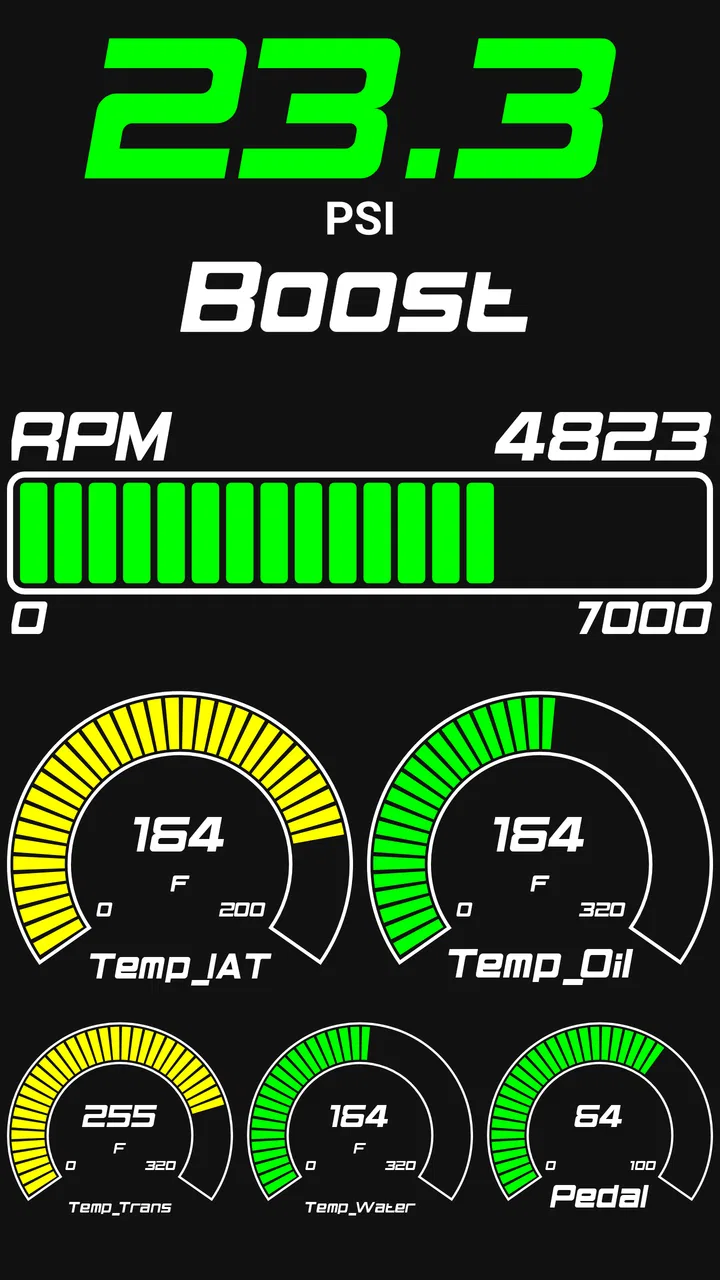
The first thing to understand is the app’s role. JB4 Mobile acts as a data logger and display for a JB4 tuner, so the tuner remains the central part of the system. The phone is the viewing and recording surface. That distinction matters because it changes what I expect from the app. I am not opening it to browse training plans, compare lap times with a community, or receive general driving advice. I am opening it to observe information connected to the vehicle and capture that information in a useful form.
You May Also Like

 Pandora - Music & Podcasts
Pandora’s Music Is Easy to Start, but Harder to Recover
Pandora’s strength is its low-effort path from a seed to a station. Its weak spot is how much confidence it asks you to place in connection, setup, and quiet recovery.

 AccuWeather: Weather Radar
AccuWeather Review: A Quick, Clear Forecast for Everyday Decisions
For everyday plans, the best forecast is the one you can understand quickly. AccuWeather makes rain timing, radar, and local conditions easy to act on, with a few trade-offs.

 Hill Climb Racing
Why Hill Climb Racing Still Turns Crashes Into One More Run
A tiny car, a bumpy hill and one more upgrade: Hill Climb Racing keeps resurfacing because its simple chaos makes every near-miss feel personal.

 AliExpress - Shopping App
AliExpress Makes Global Shopping Feel Personal, but Shoppers Bear the Risk
AliExpress turns a global marketplace into a pocket-sized discovery engine. Its reach is useful, its shopping loop compelling, and its trade-offs easy to miss.

 Lords Mobile: Kingdom Wars
Lords Mobile Is a Kingdom-Building Routine, Not a Quick Match
A case-by-case verdict on the building, battles, device demands, and social commitments that make Lords Mobile rewarding for some players and exhausting for others.

 PDF Scanner app - TapScanner
TapScanner Makes Paperwork Easier to Capture, Check, and Share
TapScanner makes scanning with a phone feel less like a rescue operation and more like a dependable step in getting work done. Its capture tools are useful, though not flawless.
More From Our News Desk
View All News


That focused design is its strongest argument. A generic dashboard application may offer attractive gauges, but it cannot replace a tool built around a particular tuning system. With this app, the information is relevant to the JB4 setup rather than being a collection of unrelated vehicle widgets. For someone diagnosing a change, checking behavior during a pull, or keeping a record after an adjustment, that direct connection is more valuable than a long menu of decorative features.
I also appreciate that the app makes the phone part of the tuning workflow without pretending to be the whole workflow. The display is useful while the vehicle is being driven, but the logging function is arguably more important. A live value can tell me what is happening at one moment; a saved record gives me something to examine afterward. That difference is easy to overlook when choosing a performance app, yet it is where a tuner companion can become genuinely useful.
Why the display matters during a drive
A live display is most useful when I have a specific question in mind. For example, after making a change to a JB4 setup, I might want to observe the vehicle under a familiar stretch of road and compare the behavior with an earlier run. The app gives me a way to keep my attention on the information relevant to that test instead of relying only on how the car feels from the driver’s seat.
That does not mean I would treat the phone as a replacement for safe driving habits. I would set everything up before moving, secure the phone where it can be seen without reaching for it, and avoid trying to interpret a crowded screen in traffic. The most sensible use is a planned test in a legal, controlled environment, with the driver concentrating on the road. The app can support observation, but it cannot make an unsafe test safe.
There is also a practical trade-off between having more information and having information that can be understood quickly. A tuner may want several readings available, while a driver needs a display that can be glanced at without distraction. I found the best approach is to decide in advance which values answer the question being tested. Showing everything simply because it is available can turn a helpful monitor into visual noise.
Logging is more valuable than a quick glance
The logging side gives JB4 Mobile a purpose beyond being a digital gauge. If I am trying to understand whether a change helped, memory is a poor measuring tool. The car may feel stronger because the weather changed, the road was different, or I expected an improvement. A recorded run gives me a better basis for comparing what happened rather than relying on impressions alone.
One useful habit is to keep each test as consistent as possible. I would use the same route, begin with similar conditions, and change one meaningful part of the setup at a time. I would also note the reason for each run outside the app, because a log is much easier to interpret when I remember what I was testing. This is a non-obvious strength of the app: it can encourage a more disciplined approach to tuning, even though it does not replace the judgment needed to interpret the results.
Another practical tip is to review logs when the car is parked rather than trying to make conclusions during the drive. The live display is for awareness; the recorded information is for analysis. Separating those jobs reduces distraction and makes it easier to spot patterns. If a user treats every live fluctuation as a problem, the app can create unnecessary worry. If the user compares complete runs thoughtfully, it becomes much more useful.
Where it differs from ordinary performance apps
Most general vehicle apps try to appeal to a broad audience. They may focus on fuel economy, maintenance reminders, navigation, simple trip records, or universal gauges. That broad compatibility is convenient, especially for someone who owns a stock vehicle or uses several unrelated tools. JB4 Mobile takes the opposite approach. Its usefulness comes from being tied to the JB4 tuner rather than from working as a universal solution.
That makes the comparison straightforward. If I want one app for basic driving information across different vehicles, I would choose a more general dashboard or trip application. If I already have a JB4 and want a display and logging companion that belongs to that setup, a generic alternative feels less appropriate. The narrower app can be the better choice precisely because it does not try to serve everyone.
The trade-off is the entry point. The listed price is $27.99, which is significant for an app with a specialized audience. I would not pay that simply to experiment with a dashboard. I would consider it only after confirming that I own the required JB4 equipment, that my intended use genuinely involves monitoring or logging, and that the app fits the way I plan to test the vehicle. For an existing JB4 user, the cost may be easier to justify as part of the tuning setup; for everyone else, it is a clear reason to skip it.
Important limitations before installing
The biggest limitation is dependency. This is not a standalone sports app that becomes useful as soon as it is installed. Its central purpose depends on a JB4 tuner, so a person without that hardware has little reason to choose it. Even a driver who owns a JB4 should think about how often they will actually review data. If the app will sit unused after a single curiosity-driven session, the purchase becomes difficult to defend.
I would also avoid treating the app as an automatic tuning authority. A display can show information, and a logger can preserve information, but neither one makes a setup mechanically sound. The user still needs to understand the vehicle, the tuner, the conditions of the test, and the limits of the changes being made. This is especially important for newer owners who may assume that seeing a value on a screen means they know what action to take. The app is an instrument, not a substitute for technical judgment.
The age rating is Everyone, but that should not be confused with the skill level required for responsible use. The software may be suitable for a broad age range, while the activity around tuning and testing still calls for maturity, preparation, and safe driving. I would recommend that younger or inexperienced users involve someone who understands the vehicle before drawing conclusions from the logs.
There is also a learning curve created by the app’s specialized purpose. A general dashboard tends to explain itself because its audience is broad. A tuner-focused display assumes that the user already knows why the information matters. That can make the first session feel less welcoming. My advice is to begin with a small, clearly defined test rather than trying to understand every reading at once. Learn what each displayed value means, decide which ones matter for the current question, and only then expand the workflow.
Everyday scenarios where it earns its place
Imagine a driver who has just made a change to a JB4 configuration and wants to compare the next drive with an earlier baseline. Before leaving, I would check the phone position, prepare the display, and decide what conditions make the comparison meaningful. During the run, I would focus on driving and let the app collect the information. Once parked, I would review the record and write down what changed. That is a realistic use case in which the app adds structure instead of merely adding another screen.
A second scenario involves troubleshooting an inconsistent feeling. Perhaps the car feels different on one drive than another, but the driver cannot tell whether the cause is the road, the weather, or the setup. A log cannot answer every question by itself, but it can prevent the discussion from being based entirely on memory. The useful insight here is that the app is better suited to repeated, comparable tests than to one dramatic run. Its value grows when the driver uses it as part of a method.
A third scenario is sharing information with a knowledgeable technician or experienced tuner. Rather than describing a drive with vague phrases such as “it felt strange,” the owner can bring recorded information into the conversation. That does not guarantee a diagnosis, but it makes the conversation more concrete. The app therefore works not only as a personal display but also as a way to make technical discussions less dependent on impressions.
For casual owners, those scenarios may sound like too much work. That reaction is fair. If I only want a simple speed display or an occasional trip summary, I would not choose this app. Its best results come from users who are willing to prepare, repeat tests, and interpret what they see. The more serious the tuning goal, the easier it is to understand the purchase; the more casual the goal, the less attractive it becomes.
Compatibility, cost, and version considerations
The current version is 3.0.5, and the app requires Android 7.0 or later. That minimum requirement is not especially demanding for a modern Android phone, but I would still check the phone I intend to use before purchasing. A dedicated older device can be convenient for vehicle monitoring, yet it should be tested in the actual mounting position and connected before relying on it during a planned run.
I would also think about the phone as part of the equipment chain. Battery level, visibility, secure mounting, and avoiding unnecessary interaction all matter more here than they would in an ordinary sports app. A phone that is fine for checking a score may be poorly placed for observing vehicle information. Preparing the device in advance is not glamorous, but it prevents the app from becoming a distraction at the exact moment the driver should be focused.
The price makes this preparation even more important. At $27.99, I would not recommend an impulse purchase based only on the short store description. The right buyer is someone who already understands the JB4 ecosystem and has a concrete reason to log or display data. If that describes you, the app’s narrow focus can be a strength. If it does not, a lower-cost general-purpose alternative will probably provide more useful value.
Who should use it and who should pass
I would recommend JB4 Mobile to an existing JB4 owner who wants a phone-based view of the tuner’s information and expects to use logging as part of regular testing. It is particularly suitable for someone who likes comparing changes methodically, wants records rather than impressions, and is comfortable learning what the displayed information means. The app makes the most sense when it becomes part of a repeatable routine.
I would be more cautious recommending it to a first-time tuner. The app can help that person observe the vehicle, but it will not teach the fundamentals of tuning or tell them how to respond to every result. A beginner may get more value by learning the vehicle and JB4 system first, then adding the app once they have specific questions they want to investigate.
I would tell stock-car owners, casual drivers, and people searching for a universal performance dashboard to skip it. The specialized connection that helps an established JB4 user is exactly what limits its appeal to everyone else. In those cases, a general monitoring app or a simpler vehicle display is likely to be easier to understand, less expensive, and more flexible.
My final verdict after weighing the trade-offs
My verdict is that JB4 Mobile is a focused tool with a defensible purpose, but it is not an easy recommendation for the average driver. Its strongest qualities are the direct relationship with the JB4 tuner, the ability to view relevant information during a planned test, and the chance to preserve records for more careful comparison. Those strengths are meaningful when the user already has the hardware and is serious about understanding changes.
Its weaknesses are just as clear: the price is high for a narrowly targeted app, the learning curve is real, and the software cannot replace tuning knowledge or safe testing practices. The 3.4 average rating reflects a product that appears useful to the right audience without being universally satisfying. I would not judge it as a conventional sports app because that would miss its purpose.
My recommendation is conditional but positive: if you own a JB4 tuner and want a dedicated display and logging companion, this is worth considering at $27.99, provided you plan to use it methodically. If you do not have the tuner, or you only want a simple vehicle dashboard, spend your money elsewhere. For the right driver, it can turn scattered impressions into organized observations; for everyone else, its specialization becomes unnecessary friction.
FAQs for JB4 Mobile
01What is JB4 Mobile, and what does it do?
JB4 Mobile is a companion app for vehicles equipped with a compatible Burger Motorsports JB4 tuning system. It connects to the JB4 through supported wireless hardware, allowing you to view live engine data, monitor parameters, change maps, read and clear certain fault codes, and record logs. The available functions depend on the vehicle, JB4 firmware, connection method, and device compatibility.
02Is JB4 Mobile compatible with my Android or iPhone and vehicle?
Compatibility should be checked before downloading or purchasing any related hardware. JB4 Mobile is designed for supported Android and iOS devices, but connection requirements can vary by platform and JB4 setup. Your vehicle must also use a compatible JB4 system and wiring configuration. Check Burger Motorsports’ current compatibility list, required adapter, operating-system requirements, and firmware notes before installation.
03Can I change engine maps and settings with JB4 Mobile?
On compatible JB4 systems, the app can provide access to map selection and certain user-adjustable settings. These controls are powerful because they influence how the tuning system operates, so they should only be changed according to the vehicle’s instructions, fuel quality, modifications, and manufacturer guidance. Incorrect settings may cause poor performance, warning lights, or mechanical damage, and some options may be unavailable on your setup.
04Does JB4 Mobile allow data logging and fault-code monitoring?
Yes, supported configurations generally allow you to monitor live readings and create data logs while the vehicle is running. These logs can help identify issues or evaluate performance, and the app may also display or clear certain diagnostic fault codes. However, JB4 Mobile is not a replacement for professional diagnostic equipment. Important warning lights or abnormal engine behavior should be investigated by a qualified technician rather than simply cleared in the app.
05Is JB4 Mobile safe to use, and does it affect my vehicle warranty?
The app itself is mainly a control and monitoring interface, but using it with a JB4 tuning system can alter engine behavior and performance. Safety depends on the vehicle, installation, fuel, map, maintenance, and driving conditions. Tuning hardware may affect a manufacturer warranty, emissions compliance, insurance, or local regulations. Review the JB4 documentation and consult a qualified installer before making changes, especially on a daily-driven or leased vehicle.
Pros
- Live engine data helps monitor performance while driving or tuning.
- Supports custom maps and user-adjustable settings for flexible tuning.
- Logging tools make it easier to review boost
- fuel
- and ignition behavior.
- Can display multiple gauges for quick access to important vehicle readings.
- Useful for diagnosing performance issues without carrying a laptop.
Cons
- Requires compatible JB4 hardware installed in the vehicle.
- Some advanced features may need additional cables or accessories.
- Incorrect settings can cause poor performance or engine-related problems.
- Bluetooth or Wi-Fi connection stability may vary between devices and vehicles.
- The interface may feel technical and confusing for first-time users.

JB4 Mobile
Gallery